This article provides a step-by-step guide on assembling a blinking LED circuit on a breadboard using the NE555 timer. Whether you're exploring 555 timer projects or simply looking to build a LED blinker circuit, this guide will help you set up a simple and effective LED flashing circuit.
Components Required:
- 555 Timer (NE555) – 1 unit
- Resistors:
- R1: 1 kΩ
- R2: 10 kΩ
- R3, R4: 1 kΩ each
- Capacitors
- C1: 33 μF
- C2: 0.01 μF (10 nF)
- LEDs – 2 units
- Power Supply – 9V battery or DC adapter
- Breadboard and connecting wires
Circuit diagram:

Steps to Assemble the LED Flasher Circuit:
-
Place the NE555 Timer on the Breadboard:
- Insert the 555 timer IC in the center of the breadboard so that each pin is easily accessible.
-
Connect Power Supply to the Timer:
- Pin 8: Connect to the positive rail (+9V).
- Pin 1: Connect to the ground rail (GND).
-
Add Resistors for Timing:
- R1 (1 kΩ): Connect between Pin 8 and Pin 7 (DISCHARGE).
- R2 (10 kΩ): Connect between Pin 7 and Pin 6 (THRESHOLD).
-
Connect the Timing Capacitor (C1):
- Connect the positive lead of C1 (33 μF) to Pin 6.
- Connect the negative lead to the ground rail.
-
Link Pin 6 and Pin 2:
- Use a short wire to connect Pin 6 (THRESHOLD) to Pin 2 (TRIGGER).
-
Add a Decoupling Capacitor (C2):
- Connect C2 (0.01 μF) between Pin 5 (CONTROL) and the ground rail. This helps stabilize the LED blinking circuit.
-
Connect LEDs for Blinking:
- Attach the anode (long leg) of the first LED to Pin 3 (OUTPUT) through R3 (1 kΩ).
- Attach its cathode (short leg) to the ground rail.
- Repeat the same for the second LED using R4 (1 kΩ).
-
Double-Check Connections:
- Ensure all components are correctly connected, as per the LED blinking circuit diagram.
-
Power the Circuit:
- Connect the 9V power source to the breadboard’s power rails. Once powered, the LEDs will alternately blink, demonstrating a basic breadboard blinking LED or LED flip-flop circuit diagram.
How It Works:
The 555 timer operates in astable mode, generating a continuous pulse to toggle the LEDs. The blinking rate can be adjusted by varying R1, R2, or C1. This project is a great introduction to breadboard projects and exploring circuit diagrams for blinking LEDs.
This is how the assembled circuit looks like on the breadboard:
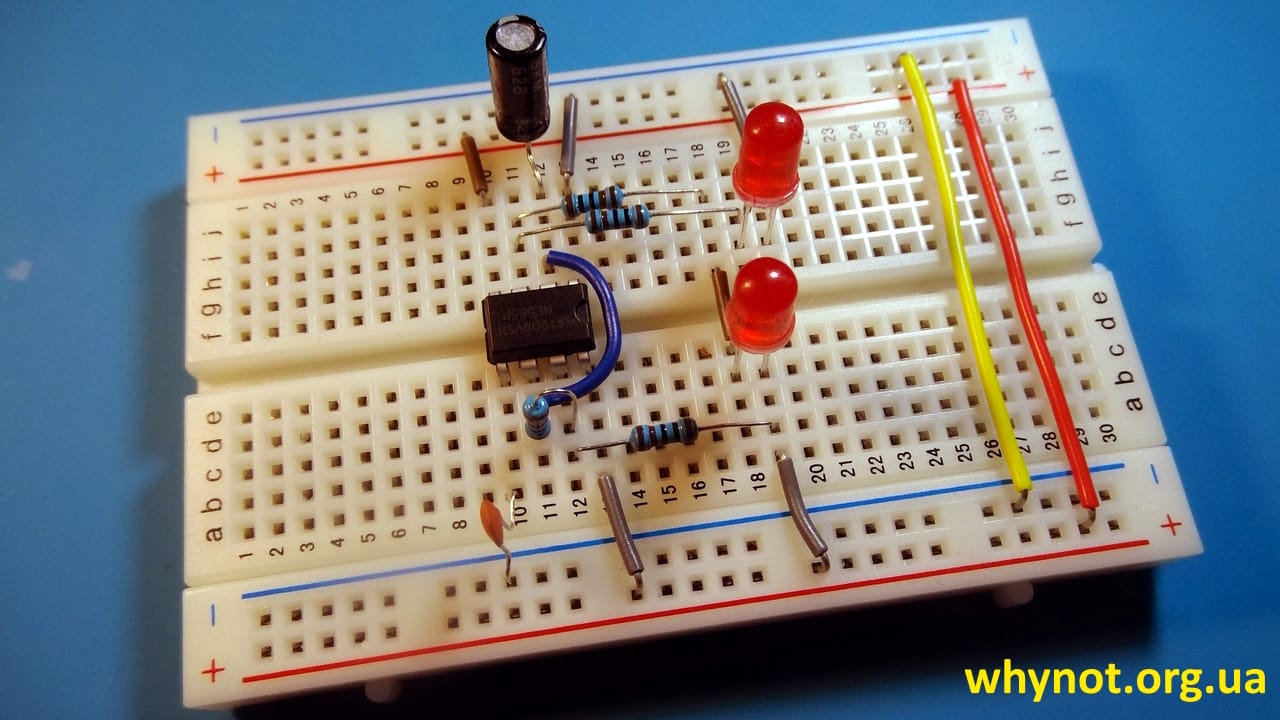
The components on the breadboard can be arranged differently from what is shown in the instructions. The key is to ensure that the electrical connections between them match the circuit diagram exactly. It's the circuit that determines the functionality, not the physical layout.
You can also watch a step-by-step video of assembling led blinker circuit on a breadboard:
Whether you’re a beginner experimenting with NE555 or someone working on advanced LED blinker circuit diagrams, this simple project showcases the versatility of the 555 timer in practical applications.
Date: 10.11.2024